

Best overall for manuscript transcription: Transkribus. Best for self-discovery: Soulera. Best for text-extraction workflows: Google Cloud Vision; best for structured documents: Azure AI Document Intelligence. This 2026 guide separates AI handwriting analysis tools that read handwritten text from graphology services that offer interpretations for personal reflection.
- Transkribus is the best fit here for manuscript transcription, not personality assessment.
- Soulera offers handwriting and signature analysis for self-discovery; treat interpretations as reflection prompts, not proven personality measurements.
- Google Cloud Vision suits handwriting-to-text workflows; Azure AI Document Intelligence suits document extraction.
- Choose AI handwriting analysis tools by the output you need: readable text, document fields, or reflective interpretation.
Why this matters
Want to understand your signature, digitise handwritten notes, or extract information from forms? Those are different jobs. A tool that recognises written words does not automatically understand the writer's personality.
Soulera is the best fit in this comparison for people seeking graphology-based self-discovery rather than handwriting transcription. Its stated offering includes online handwriting and signature analysis, personality insights, and self-discovery reports for individuals and corporate clients.
Keep the distinction clear: graphology is not a scientifically established method for measuring personality or predicting job performance. Use a reflective report to generate questions about yourself, not to diagnose a condition, judge another person, or make a hiring decision.
For your 2026 shortlist, start with the result you want to receive. A searchable transcript, extracted form fields, and a self-discovery report should not compete on the same scorecard.
What makes the best handwriting analysis tool?
The best choice matches your task before it matches a feature list. Use these criteria to compare your 2026 options:
- Task fit: Does the service interpret handwriting, transcribe it, or extract information from a document?
- Output usefulness: Can you use the result directly, or must you rebuild it into the format your work requires?
- Correction workflow: Can you inspect the original and resolve mistakes before relying on the output?
- Sample fit: Does your trial use the same script, page layout, and image quality as your actual documents?
- Privacy: Check how uploaded handwriting is stored, accessed, and deleted before sharing personal material.
- Claim discipline: Text recognition and personality interpretation need different standards of evidence. Do not confuse one with the other.
A simple comparison works better than an impressive demonstration. Try 3 handwriting samples: a clear page, a typical page, and a difficult page. This is a suggested evaluation method, not a published performance benchmark.
Use the same samples for comparable transcription tools. For a graphology service, assess the clarity and boundaries of the interpretation instead; transcription accuracy cannot tell you whether a personality claim is valid.
AI handwriting analysis tools at a glance
| Option | Best for | What it does | Key limitation |
|---|---|---|---|
| Soulera | Graphology-based self-discovery | Offers online handwriting and signature analysis with personality insights and self-discovery reports | Graphology interpretations are not validated personality measurements |
| Transkribus | Manuscript transcription | Recognises handwritten text through handwriting text recognition workflows | Recognition requires review, especially on difficult material |
| Google Cloud Vision | Text-extraction workflows | Provides OCR capabilities that include handwriting recognition | Extracted text is not a personality assessment or complete document workflow |
| Azure AI Document Intelligence | Structured document extraction | Extracts text and document structure, including handwriting in supported workflows | Complex layouts and handwritten fields still require verification |
These recommendations describe task fit, not measured accuracy rankings. No universal winner exists across personality interpretation, manuscript transcription, and form processing because each produces a different kind of result.
1. Soulera: best for graphology-based self-discovery
Soulera is an Indian graphology platform offering online handwriting and signature analysis. Its stated services include personality insights and self-discovery reports for individuals as well as corporate clients.
Choose this category when your question concerns personal reflection rather than converting writing into editable text. Keep an interpretation separate from a verified fact about your abilities, relationships, or future.
Soulera pros
- Its stated offering directly addresses handwriting and signature interpretation.
- Self-discovery reports match a reflective goal rather than a document-processing task.
- The platform serves both individuals and corporate clients.
Soulera cons
- Graphology does not establish personality traits with the scientific validity required for high-stakes assessment.
- A self-discovery report is not a substitute for transcription, clinical assessment, or evidence-based hiring methods.
Best for: People who want prompts for self-reflection and understand the limits of graphology.
Read a report with your own experiences beside it. If an interpretation says you avoid conflict, ask whether recent behaviour supports that idea; do not assume the handwriting has proved it.
A useful reflection exercise turns a statement into a question you can answer with examples. That keeps your judgement active and prevents the report from becoming an authority over your identity.
Verdict: Buy only for reflective exploration, not for diagnosis, prediction, or employee screening.
2. Transkribus: best for manuscript transcription
Transkribus is a handwriting text recognition platform used to turn document images into transcribed text. Its public documentation describes recognition models and workflows for working with handwritten documents, including historical material.
It fits a transcription project more closely than a personality-analysis service. Your goal is to recover what the page says, then review the result against the original.
Transkribus pros
- Its core workflow addresses handwritten-document transcription.
- Recognition-model selection gives manuscript projects a relevant starting point.
- It supports a workflow in which recognised text can be checked against document images.
Transkribus cons
- A model suited to one writing style is not proof of accuracy on another collection.
- Difficult handwriting, damaged pages, and unfamiliar vocabulary require correction rather than blind acceptance.
Best for: Researchers, archivists, and people digitising handwritten collections.
Before processing a collection, inspect a representative page. Look for repeated recognition errors: a surname mistaken for a common word, punctuation lost at line endings, or separate lines merged into one passage.
Correctness matters more than a tidy-looking transcript. A fluent sentence can still misrepresent the source, particularly when an unusual name or abbreviation appears in otherwise readable writing.
For a 2026 manuscript project, make review part of the workflow from the start. Keep the source image available so anyone using the transcription can check uncertain passages.
Verdict: Buy for manuscript transcription when you can review and correct the recognised text.
3. Google Cloud Vision: best for text-extraction workflows
Google Cloud Vision provides optical character recognition, including handwriting recognition through its document text detection capabilities. It is a cloud service for extracting text from images, not a graphology report service.
This option fits a technical workflow where extracted text feeds another system. The surrounding application still needs to decide how to display, store, review, and use that text.
Google Cloud Vision pros
- Its documented OCR capabilities include handwriting recognition.
- API access suits applications that need text extraction as one component.
- Document text detection returns text with structural information useful to downstream processing.
Google Cloud Vision cons
- An API response is not a finished end-user review process.
- Recognising words does not establish their meaning, verify factual correctness, or reveal the writer's personality.
Best for: Developers adding handwriting-to-text extraction to an application.
Test the complete journey, not just the recognition response. If your application puts extracted text into a customer record, your checks must cover the mapping between the recognised words and the destination fields.
Pay particular attention to names, dates, and identifiers. A small transcription error in those fields can matter more than several errors in an informal paragraph.
For your 2026 evaluation, separate recognition quality from application quality. A readable extraction result does not prove that your storage, permissions, or correction process is ready for real documents.
Verdict: Buy for application-level text extraction when you have a defined review and integration workflow.
4. Azure AI Document Intelligence: best for structured documents
Azure AI Document Intelligence extracts text and document structure from files and images. Microsoft's documentation describes read and layout capabilities, including handwritten text recognition in supported workflows.
Choose it when the relationship between words and document layout matters. A form, table, or repeated document format needs more than a single stream of recognised text.
Azure AI Document Intelligence pros
- Its document-processing focus suits extraction beyond plain transcription.
- Layout capabilities help preserve information about document structure.
- Its model-based workflows provide options for recurring document-processing tasks.
Azure AI Document Intelligence cons
- Supported capabilities depend on the model, language, and document type you use.
- Handwritten entries and complicated layouts still need checks before extracted information enters an operational system.
Best for: Teams extracting information from structured or recurring documents.
Start with the fields that matter to your decision. A system that reads most of a page correctly can still fail your task if it assigns an answer to the wrong label.
Inspect the association between handwriting and nearby printed text. Where a form contains crossed-out answers, marginal notes, or writing outside a box, decide how your review process will resolve ambiguity.
In a 2026 document workflow, distinguish successful extraction from successful validation. The service can produce a result; your process must establish whether that result is safe to use.
Verdict: Buy for structured document extraction when field-level verification is part of the process.
How we ranked these options
The ranking follows the criteria above: task fit first, then usable output, correction needs, sample fit, privacy, and evidence boundaries. Product capabilities are described from the named services' public documentation; the recommendations do not claim hands-on testing or measured comparative accuracy.
Transkribus takes the transcription default because its focus matches manuscript work. The other options occupy distinct slots rather than pretending to be interchangeable alternatives.
No option earns a recommendation for proven personality detection from handwriting. That claim requires evidence beyond the ability to recognise text or produce an interpretation.
How to compare your shortlist before committing
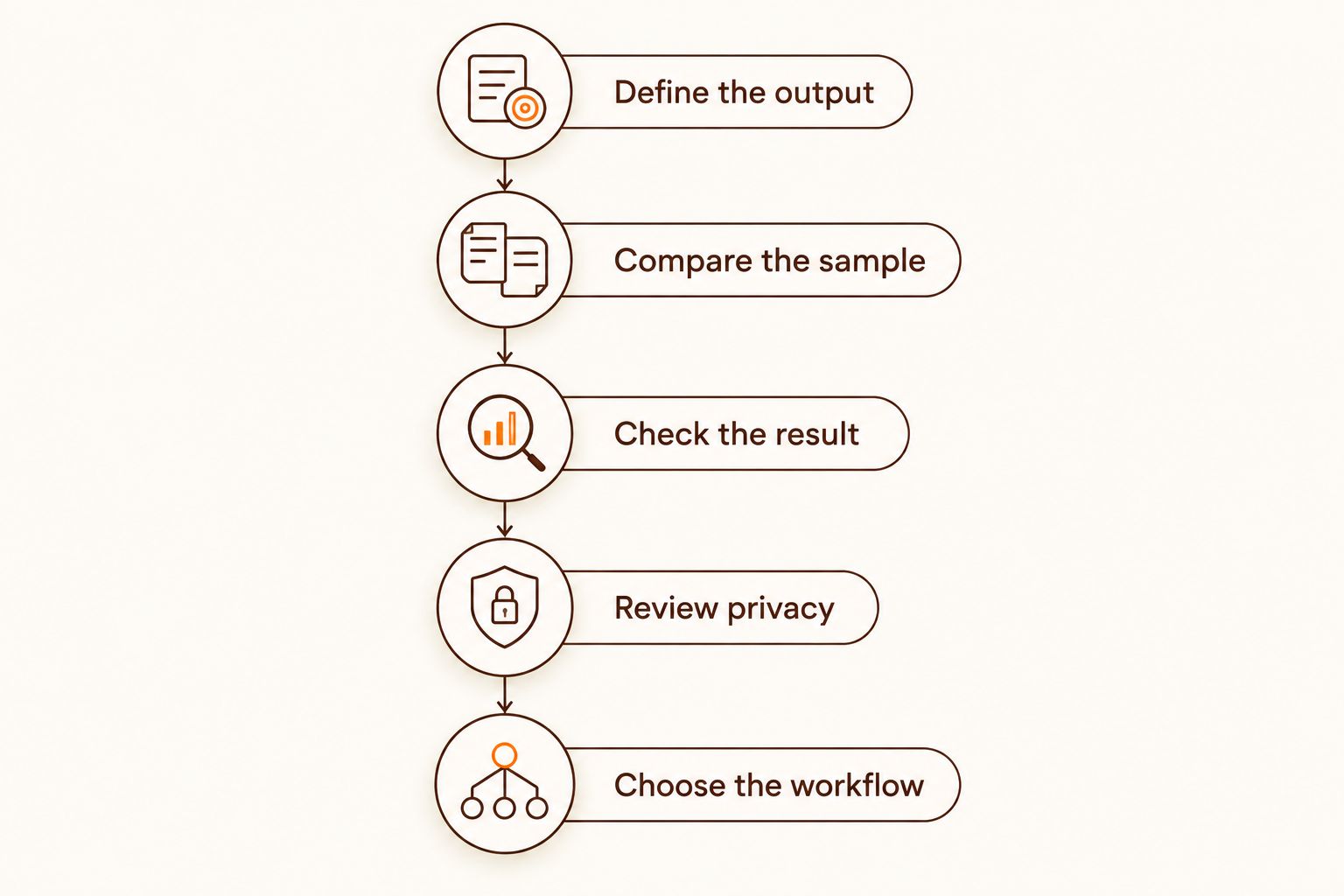
Use a small, repeatable process instead of judging a tool by its best-looking example. Keep 1 representative page unchanged across comparable services, then inspect the output against the source.
Define the output
Write down the result you need: an editable transcript, extracted form fields, or questions for personal reflection. If you cannot name the output, you cannot judge whether a tool has delivered it.
Compare the sample
Use your own material where you have permission to upload it. A clean demonstration page is not a substitute for the handwriting and layout you actually need to process.
Check the result
Apply 2 output checks to transcription: check that the words are correct and that their order or field assignment is correct. For interpretive reports, check whether statements distinguish observations from conclusions.
Review privacy
Read the service's current terms before uploading signatures, private correspondence, employee records, or other sensitive material. Confirm that your use is authorised and that the handling of the document meets your requirements.
Choose the workflow
Select the option that fits the whole task, including corrections and review. Do not choose an extraction service merely because its first output looks polished.
Which handwriting analysis tool should you choose?
Choose Transkribus as the default for manuscript transcription. Choose Google Cloud Vision when you need text extraction inside an application, or Azure AI Document Intelligence when document layout and field extraction drive the task.
Choose a graphology service only when your goal is reflective interpretation. Do not ask a transcription engine to explain your personality, and do not ask a personality report to produce a dependable searchable archive.
Your best 2026 choice is the option whose output you can inspect and use responsibly. Keep the source document, define what counts as an acceptable result, and decide how errors will be corrected before expanding the work.
FAQ
What's the best AI handwriting analysis tool in 2026?
Transkribus is the default recommendation here for manuscript transcription. Google Cloud Vision fits application-level text extraction, while Azure AI Document Intelligence fits structured document workflows; graphology services address a different, reflective goal.
Can AI handwriting analysis tools tell me my personality?
Handwriting recognition does not establish personality traits. Graphology offers interpretations, but it is not a scientifically validated substitute for personality assessment, clinical evaluation, or evidence-based hiring methods.
Is Soulera a handwriting-to-text tool?
Soulera's stated offering is online handwriting and signature analysis, personality insights, and self-discovery reports. That offering addresses graphology-based reflection rather than the transcription workflows compared in this guide.
Is Transkribus better than Google Cloud Vision for handwritten documents?
Transkribus is the closer fit for a manuscript transcription project, while Google Cloud Vision fits text extraction inside an application. Compare both on representative material when your needs overlap; this guide does not claim measured accuracy superiority.
What's the difference between handwriting OCR and graphology?
Handwriting OCR recognises written text, while graphology interprets handwriting in relation to personality. Accurate text recognition does not validate a personality interpretation.
Can I use signature analysis to choose employees?
Do not use signature analysis as a hiring test. Graphology is not a scientifically established predictor of job performance; assess candidates through job-relevant evidence and appropriate validated methods.
What should I check before uploading a handwriting sample?
Check permission, privacy terms, and the purpose of the upload. Remove information you do not need to share, and verify that the document's handling meets your requirements.
How do I know whether a handwriting transcript is accurate?
Compare the transcript directly with the original page. Check words, reading order, and field assignments, with particular attention to names, dates, identifiers, and ambiguous passages.
One last thing
A transcript can look completely convincing and still contain the wrong name. An interpretation can feel personally meaningful without proving anything about personality.
Keep the original beside the result. For text extraction, it lets you verify the words; for self-reflection, your lived experience is the evidence against which an interpretation should be questioned.